Theory
Section Summary
But first, let’s understand how the current project works in theory.
Understanding the Project
It is recommended that as you read this tutorial, you explore the different files of the project yourself. Our repository is generally divided into a few key areas:
├── control/        # Main code for robot control, vision, and strategy
├── docs/           # You are here! Source files for the mdBook documentation
├── firmware/       # Embedded systems code for the physical robots
├── simu/      # (TODO) Simulator environment and integration components
└── logs/           # Real-time application execution logs
control: The core path planning, geometry utilities, and behavior tree execution.simu: The integration code bridging the simulator environment to our main strategy loop.docs: The source code for these Onboarding pages.
(todo) Expand detailed explanation of the current folder usage and structural dependencies…
Pipeline
Imagine your robot is a real soccer player. For it to work, its “brain” (the code) needs to process information in a logical order, like an assembly line.
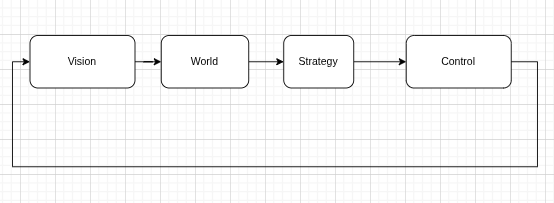
(todo) Provide a detailed code snippet and pipeline loop explanation specific to our newly adopted integration structure…
Vision (The Eyes)
The robot receives images from up to 4 different cameras on the ceiling of the field. The vision system processes this computer program data and generates the raw positions of the ball and players (SSL vision). Our job is to mix and match the data from the different cameras, parse (they might not always be in order). And pass it to the next stage.
State (The Mental Map)
The system takes this noisy data and filters our view into an established “ground truth” to get the most accurate position of the ball and players It structurally maps out what is happening on the field right now.
Strategy (The Coach)
This is where the high-level intelligence—implemented using Behavior Trees—decides what the robot should do. For example: if the ball is close, the robot should approach and kick; if defending, it should block a passing lane.
The output of this layer is a desired objective, such as a target position, velocity, or action.
Control (The Brain)
This layer is responsible for translating high-level objectives into precise, physically feasible motion.
Given a target (e.g., position or velocity), the control system computes how the robot should move over time to achieve it. This includes:
- Trajectory tracking: Converting targets into smooth motion
- Feedback control (e.g., PID): Continuously correcting errors between desired and actual state
- Kinematics & dynamics: Mapping global motion (x, y, rotation) into wheel velocities
- Constraints handling: Respecting limits like maximum speed, acceleration, and motor capabilities
The control layer does not decide what to do—it ensures that what was decided is executed as accurately and robustly as possible.
Firmware (The Muscles)
This layer runs on the robot and directly interfaces with the hardware.
It receives low-level commands (e.g., wheel velocities) and is responsible for:
- Driving motors using PWM signals
- Reading sensors (encoders, IMU, etc.)
- Applying very fast local control loops when necessary (e.g., motor-level PID)
In short, while the control layer computes how the robot should move, the firmware ensures that the motors actually follow those commands in the real world.
Coach vs Play vs Skills
(todo) This section will be covered in later documentation explicitly detailing the strategy modules.
You are ready to start the practice section. Click here to continue: